If you step into any modern workspace or cafe in Lahore, Karachi, or Islamabad, you will see the exact same setup on almost every table: an Apple iPhone sitting right next to a MacBook Air. It is the ultimate lightweight productivity combination. But carrying two separate, bulky white Apple charging bricks in your laptop bag is annoying. Naturally, you start looking for a single compact adapter that can juice up both devices at the same time.
When searching for options, you generally get stuck between two specific form factors: a single-port 30W brick or a dual-port 40W adapter. Deciding on a Anker 30W or 40W dual charger isn’t just about matching numbers; it requires looking closely at how Apple hardware handles power input.
In Pakistan, our buying decision faces two unique challenges: intense summer room temperatures that cause devices to overheat, and erratic electrical lines that stress phone components. To preserve your expensive device motherboards and protect your maximum battery health capacity over time, you need to understand exactly how these different wattages behave under real-world daily usage.
The Technical Truth About iPhone and MacBook Air Power Draw
Most users assume a charger forces power into a device. That is a myth. Your device only draws the specific amount of wattage its internal power management chips allow.
An iPhone 13 Pro Max, 14 Pro Max, or newer iPhone 15/16 Pro Max maxes out its power draw around 27W when the battery is below 50%. A base model iPhone (like the standard iPhone 13 or 14) caps its intake closer to 20W.
A MacBook Air (whether it runs an M1, M2, or M3 Apple Silicon chip) bundles natively with a baseline 30W power adapter. It can draw more power if you utilize a fast-charging brick, but 30W is the default threshold required to charge the machine efficiently while you are working on it. ( iphone Charging Guide )
The Core Dilemma: Single-Port 30W vs. Dual-Port 40W
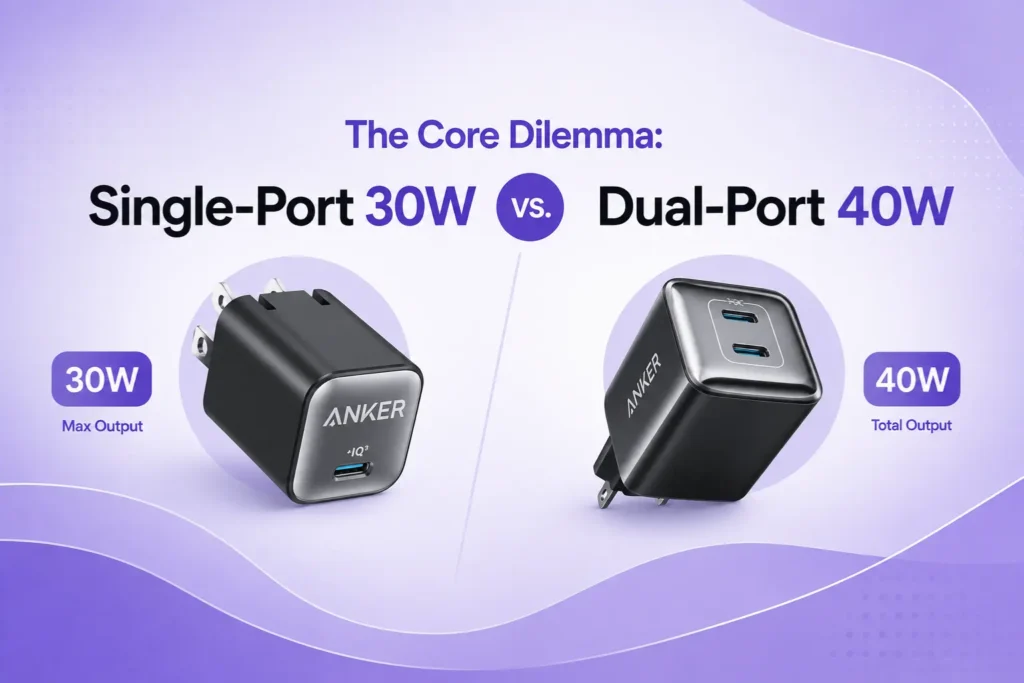
Is a 30W or 40W dual charger better for charging an iPhone and MacBook Air simultaneously?
- [Atomic Answer]: A dedicated 30W charger is optimal for powering a MacBook Air or an iPhone individually at maximum speeds. However, a 40W dual charger is the superior choice for multi-device setups because it distributes power simultaneously, giving a clean 20W to your iPhone and a steady 20W trickle-charge to your MacBook Air.
| Pixel Model Tier | Max Power Intake | Optimal Google Match | What Happens if You Over/Under-Power? |
| A-Series (6a, 7a, 8a, 10a) | 18W | Google 30W Charger | 45W brick offers 0% speed increase; capped by hardware. |
| Base & Standard Pro (7, 8, 9, 10, 9 Pro) | 27W | Google 30W Charger | 30W hits the absolute maximum ceiling. 45W is redundant. |
| Pro XL Series (9 Pro XL, 10 Pro XL) | 37W | Google 45W Charger | 30W charger will slow down charging times by capping at 27W. |
Inside the Power Splitting Logic of Dual Chargers
This is where most local consumers get confused. If you buy a dual-port 40W charger, it does not mean both ports output 40W at the same time. Electronic hardware relies on intelligent dynamic power allocation rules.
When you plug a single cable into a dual-port 40W adapter, it delivers the full 40W block to that single device. This is excellent for fast-charging your MacBook Air quickly while the lid is closed.
The moment you attach a second cable to power your iPhone alongside the laptop, the internal circuit splits the output down the middle, allocating 20W to each port.
What a 20W Split Means for Your Gear
- For your iPhone: 20W is completely fine. It matches the baseline fast-charging limit for standard Apple devices perfectly.
- For your MacBook Air: 20W is below the standard 30W factory requirement. If you are rendering a 4K video project, running heavy code scripts, or keeping your screen brightness at 100%, your laptop will consume power faster than the 20W line can replenish it. Your battery percentage might slowly drop even while plugged into the wall.
Impact on Battery Health Longevity in Pakistani Conditions
Ambient temperature plays a massive role in lithium-ion battery degradation. When a device charges, resistance inside the battery cells generates internal heat waves. If you combine high charging wattage with a 40°C Pakistani summer afternoon without air conditioning, your device battery will degrade fast.
| Feature Matrix | Single-Port 30W GaN Adapter | Dual-Port 40W Pro Adapter |
| MacBook Air Performance | Full 30W baseline speed sustained | 40W single device / 20W dual split |
| iPhone Fast Charging | Max 27W capacity draw (Pro Max) | Clean 20W standard fast charging |
| Simultaneous Charging | No (Requires swapping cables) | Yes (Dual USB-C ports active) |
| Thermal Profile Under Load | Concentrated, lower device heat | Higher brick heat during splits |
| Best Travel Workflow | Best for single-device priorities | Best for dual overnight charging |
Using a 40W charger configured to output 20W to your iPhone reduces the thermal load on your phone’s battery cell compared to blasting it with a high-wattage 30W or 45W single-port stream. Slower, controlled energy delivery at 20W keeps the phone cool, extending its structural lifespan and keeping your maximum battery capacity healthy for a longer period.
Selecting Your Authentic Anker Hardware From TechTouch.pk
To implement a single-charger lifestyle safely without risking cheap local counterfeit clones that leak voltage, match your daily routine to these verified options:
The Dedicated Compact Option: Anker 511 Charger (Nano 3 30W)
If your primary goal is to keep your items small and lightweight, the Anker 511 Charger (Nano 3 30W) is a great fit. It matches the exact 30W input baseline of the MacBook Air and supports maximum 27W charging for the iPhone Pro Max series. It features a single USB-C port with a folding plug layout, making it easy to slip into your front pocket. The main drawback is that you have to manually swap the cable back and forth between your laptop and phone.
The True Dual Workflow: Anker 521 Nano Pro (40W USB-C GaN Fast Charger)
If you want to plug both devices into the wall before going to sleep and wake up with both batteries at 100%, select the Anker 521 Nano Pro 40W USB-C GaN Fast Charger. It outputs the full 40W block to your laptop when used alone. When charging your phone and laptop together, its internal chip routes a clean, safe 20W to each device automatically, keeping your iPhone cool and slowly topping up your MacBook Air without overloading your wall outlet.
FAQs
Will using a 40W charger degrade my iPhone battery health faster than a 20W brick?
No. An iPhone only draws the specific wattage its internal charging circuits allow. When plugged into a 40W adapter alone, an iPhone Pro Max will pull a maximum of 27W, while a standard model pulls 20W. It will not overload or degrade your battery cell health.
Can a 20W output from a dual charger damage a MacBook Air battery?
No, it will not cause electronic damage. A 20W output is simply slower than Apple’s standard 30W brick. Your laptop will charge slowly while closed. If you use the laptop heavily while attached to a 20W line, the machine may slowly consume its own battery power to keep up with performance demands.
Why does my dual USB-C charger disconnect for a second when I plug in a second device?
This occurs because the internal processor is resetting its intelligent power allocation rules. The brick temporarily cuts off current flow for a fraction of a second to recalculate and split the total wattage output safely into separate streams, protecting your hardware from sudden voltage changes.